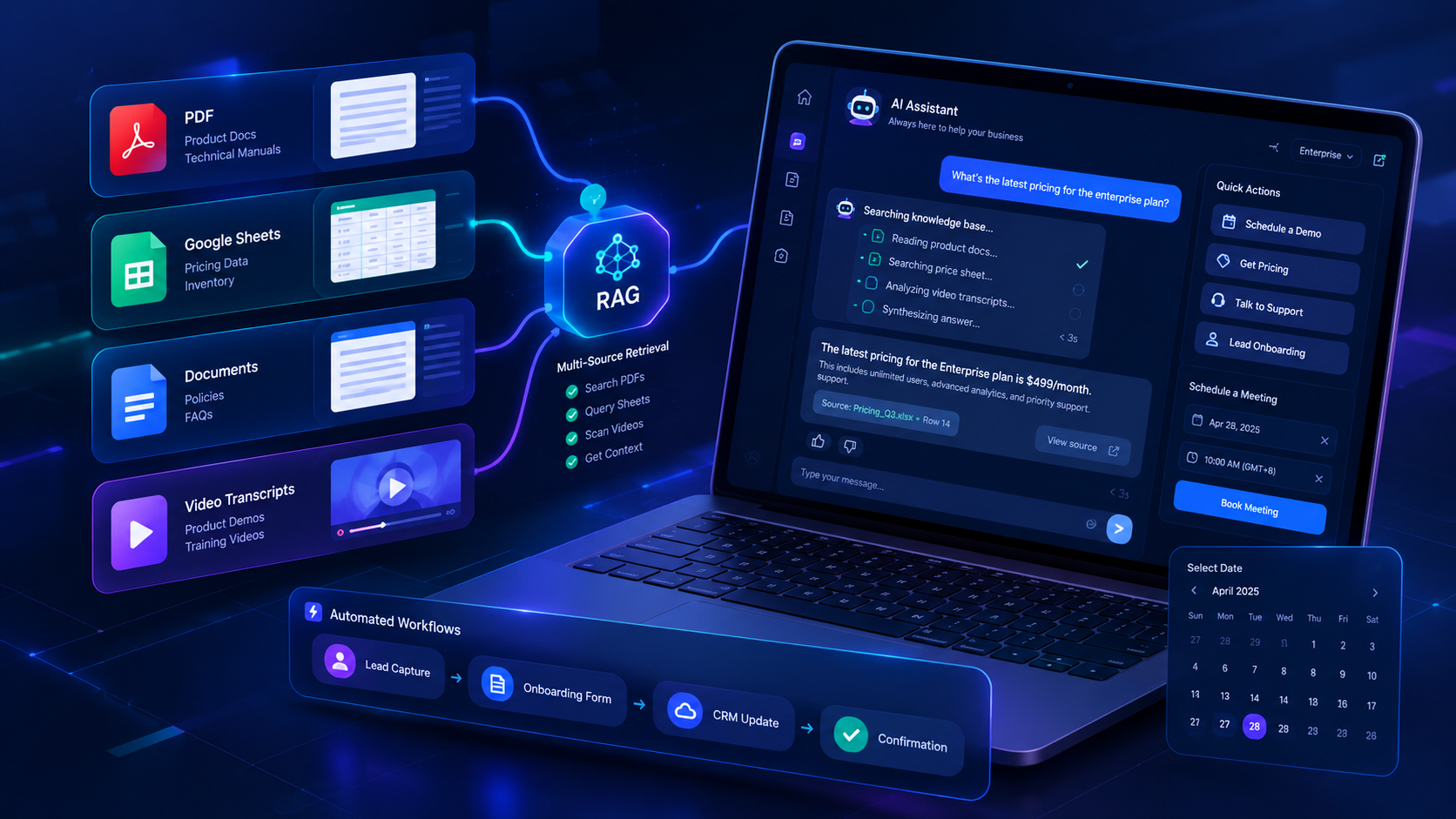
Next-Generation B2B AI Chatbot UX/UI Design: From Multi-Source RAG to a Premium Widget Experience
SUMMARY:
Discover a comprehensive UX/UI design blueprint for B2B AI chatbot widgets in 2026. Synthesizing research and best practices from UX Planet, Quiq, UX Patterns, Telus Digital, Neuron UX, Eule Institute, and TryKrux, this guide explores multi-source RAG (PDFs, Google Sheets, videos), sub-200ms response acknowledgment, graceful fallbacks, and automated workflow integration.
In the era of Generative AI, the defining challenge for B2B AI chatbot platforms is no longer simply integrating large language model (LLM) APIs. The real challenge lies in delivering a seamless and trustworthy UX/UI when the chatbot is embedded directly into an enterprise website.
A chatbot that allows businesses to train AI on heterogeneous data sources-including PDFs, text, video transcripts, and Google Sheets-while also supporting drag-and-drop workflow automation for tasks such as lead onboarding, booking, and order lookup requires a significantly higher design standard than a conventional chat box.
End users are no longer simply "chatting." They are interacting with an intelligent, task-oriented assistant capable of retrieving information, guiding decisions, and executing actions.
This article synthesizes leading UX/UI research and Conversational AI frameworks from UX Planet, Quiq, UX Patterns, Telus Digital, Neuron UX, Eule Institute, and TryKrux to establish a practical design benchmark for B2B AI Chatbot Widgets in 2026.
1. The 6-Phase Conversational Design Framework
According to Quiq's comprehensive guide "Conversational AI Design: The Complete Guide for 2026", building an enterprise virtual assistant can be structured around a six-phase lifecycle:
- Define Objectives: Clearly distinguish between informational Q&A/RAG retrieval and actionable task workflows, such as onboarding forms, lead capture, booking, and webhook triggers.
- Persona & Branding: Drawing from research by Fast Company and visual design trends on Behance and Dribbble, modern AI products benefit from dynamic visual elements, friendly minimalist avatars, and flexible theming that can be adapted to each tenant's brand identity.
- Conversation Mapping: As highlighted by Neuron UX, open-ended chat input should be balanced with structured guidance, such as quick-reply chips, suggested prompts, and predefined actions.
- Dialogue & Workflow Actions: Seamlessly connect multi-source data-including Google Sheets, PDFs, documents, and video transcripts-with automated workflow nodes and actionable conversation flows.
- Guardrails & Fallbacks: Establish clear boundaries for situations where the AI lacks sufficient context, cannot confidently answer a question, or encounters an operational error.
- Test & Iterate: Continuously monitor human handoff rates, user feedback (such as like/dislike signals), unsuccessful queries, and retrieval accuracy to improve the overall experience.
2. Perfecting AI Loading & Thinking States
When a chatbot processes multi-source RAG queries-such as retrieving vector embeddings from PDFs, querying Google Sheets, or searching video transcripts-some level of latency is inevitable. Thoughtful loading-state design plays a critical role in shaping the user's perception of responsiveness.
Real-Time Response Benchmarks:
Research from "The 5 Design States (and 2 Forgotten) in 2026" by Eule Institute and "8 AI UX Patterns Every Product Team Gets Wrong" by TryKrux highlights several important principles:
- Sub-200ms Acknowledgment: Provide immediate visual feedback after the user presses Send, such as a subtle animation, initialization indicator, or other lightweight confirmation.
- Pulsing Skeleton / Dynamic Indicator: Use dynamic indicators instead of static loading spinners to reduce the perception that the system is stalled or unresponsive.
- Active Communication at 3–4s: If processing takes longer, display contextual progress messages such as "Reading documents..." → "Searching the pricing sheet..." → "Synthesizing the answer..."
- Graceful Fallback at 10s+: Provide clear retry options, alternative actions, or fallback routing instead of leaving users with an indefinite loading state.
Technical Architecture of AI Loading States (UX Patterns):
| Component | Implementation | UX Objective |
|---|---|---|
| Request State | Visual acknowledgment that the request has been received and queued | Reduces connection anxiety |
| Status Label | Dynamic pipeline tracker (Searching the knowledge base...) | Makes AI processing more transparent and understandable |
| Streaming Placeholder | Server-Sent Events (SSE) token streaming from the first available response | Minimizes perceived latency |
| Cancellation Control | "Stop Generating" button | Gives control back to the user |
| Fallback State | Retry option or question-rephrasing prompt | Prevents dead ends |
3. Managing System Boundary States in Embedded Widgets
The UX case study "Redesigning a Chatbot: A UX Case Study" on UX Planet demonstrates how embedded B2B2C widgets can fail when edge cases and system boundary states are overlooked:
- Empty State: Provide a personalized tenant greeting, assistant avatar, and 3–4 starter prompt chips (e.g., "Product Pricing", "Schedule a Demo", "Talk to Support").
- Offline / Reconnecting State: Display a non-intrusive top banner ("Connection lost. Reconnecting...") and temporarily disable input while preserving any unsent user content.
- Session Resumed: Preserve conversation history and provide clear timestamp dividers (e.g., "Session resumed at 14:30") so users understand where the previous session ended.
- Action Pending State: Render interactive structured cards-such as form inputs, date pickers, dropdowns, and confirmation controls-directly within the conversation flow during multi-step workflows.
4. Edge Cases & Guardrails: When AI Is Uncertain
Enterprise chatbots should avoid presenting unsupported information as fact. When the available reference material does not contain an answer, handling uncertainty transparently helps build user trust.
Transparency by Default (Telus Digital):
- Declare AI Identity: Clearly inform users that they are interacting with an AI assistant.
- Source Attribution: Attach source badges to answers (e.g., [Source: Pricing_Q3.xlsx - Row 14]) and allow users to click through to preview the relevant source excerpt.
3-Tier Graceful Fallback Strategy (Quiq & Neuron UX):
- Tier 1 (Acknowledge Limits & Reframe): "I couldn't find specific details regarding [Refund Policy] in our available documents. Did you mean one of these topics?"
- Tier 2 (Quick Action Buttons): Present actionable options such as [View Help Center], [Rephrase Query], or [Leave a Message].
- Tier 3 (Human Escalation / Lead Capture): Provide a clear path to contact a human agent or launch a lead/contact capture form.
5. Essential Design Checklist for B2B SaaS Chatbot Widgets
[ ] Multi-Tenant White-Labeling: Support customizable primary colors, avatar, greeting copy, chatbot name, theme, and left/right widget placement.
[ ] Smart Input Bar: Support free-text input, quick-reply chips, suggested prompts, and drag-and-drop file/image attachments.
[ ] Real-Time Streaming Response (SSE): Deliver the first available response as quickly as possible with smooth streaming and typing animations.
[ ] Source Citations & Verification: Provide interactive modals, tooltips, or source previews that allow users to verify the exact documents and excerpts used to generate an answer.
[ ] Interactive Workflow Nodes: Support inline components such as date pickers, dropdowns, forms, confirmation cards, and lead capture forms directly inside the conversation.
[ ] Integrated Feedback Loop: Provide thumbs-up/down feedback with a lightweight feedback modal, enabling product teams to continuously identify retrieval, response-quality, and UX issues.
[ ] Full Accessibility (WCAG 2.1 AA): Support complete keyboard navigation (Tab, Esc to close), screen-reader labels, visible focus states, and sufficient color contrast.
Conclusion:
In the era of autonomous AI agents, a high-quality B2B chatbot is defined not only by the intelligence of its underlying model, but also by its micro-interactions, transparency, resilience, and conversational UX.
By carefully designing loading states, providing transparent source citations, handling uncertainty gracefully, and integrating actionable workflow components directly into the conversation, a simple chat widget can evolve into an enterprise-grade customer engagement and automation hub.
The goal is no longer to build a chatbot that simply answers questions.
The goal is to create an AI assistant that can understand, retrieve, guide, and act-while keeping users informed and in control throughout the experience.
References
- Quiq - Conversational AI Design: The Complete Guide for 2026
Lauren Winder, updated April 30, 2026. - EULE Institute / CorsoUX - The 5 Design States (and 2 Everyone Forgets) for Great UX
EULE Institute, December 3, 2019. - Krux - 8 AI UX Patterns Every Product Team Gets Wrong
Krux Team, April 13, 2026. - TELUS Digital - Conversational AI Assistant Design: 7 UX/UI Best Practices
Shailee Rindani, November 15, 2023. - TELUS Digital - Mastering Conversation Design in the Age of AI-Powered CX
Connor Harrison, Elizabeth McCoy, and Robbie McCown, February 19, 2026. - TELUS Digital - The Future of AI Interfaces: Research and Roadmap to 2030
Research report on the future of AI interfaces. - UX Planet - Redesigning a Chatbot: A UX Case Study
Case study on chatbot redesign, system states, conversation flows, and edge cases in chatbot experiences.